
salescoach.
AI for Sales · Free practical training

Put AI to work.
Build better sales relationships.

From ideas to results. Learn to find the right buyers, prepare better conversations, create stronger proposals, and coordinate a team of AI agents.

Illustration of sales colleagues reviewing customer journey materials together
AI-generated editorial illustration · Human connection comes first.
Your first week

One workflow. One real result.

  1. Prepare: build a reviewed account brief and practice your discovery questions.
  2. Follow through: draft a proposal, record commitments, and agree on the next step.
  3. Improve: review your customer experience and test one specific change.

These are self-paced lessons and suggested exercises, not a certification or a promise of sales results. Start with your existing tools.

Learn → Practice → Review

Your AI sales training library.

Every lesson includes four practical steps, an example, a reusable prompt, an assignment, and a measure of progress. Select the topic that matches today’s work.

16 of 16 lessons · Free, self-paced training

Start here

Build your first AI sales workflow

Turn one messy task into a repeatable process you can review in 20 minutes.

Open lesson →
Find your buyers

Persona identification and sales targeting

Define a useful ideal customer profile from evidence, then prioritize accounts.

Open lesson →
Find your buyers

Lead generation with AI

Build a small, relevant prospect list and an outreach plan worth responding to.

Open lesson →
Find your buyers

Competitive analysis that improves discovery

Create a sourced comparison that includes doing nothing and building internally.

Open lesson →
Earn trust

Discovery and relationship building with AI

Prepare better questions, listen carefully, and follow through on what matters.

Open lesson →
Earn trust

Proposal generation and business cases

Produce a clear, scoped proposal from confirmed discovery notes.

Open lesson →
Earn trust

Ben Franklin close and practical sales techniques

Use closing methods to help a buyer make an informed decision.

Open lesson →
Keep your promises

CRM with AI and pipeline hygiene

Turn notes into proposed CRM updates with a traceable review step.

Open lesson →
Keep your promises

Customer experience planning and retention

Connect the promise made in sales to the experience after purchase.

Open lesson →
Grow demand

AI marketing planning and social media

Connect a focused campaign to sales conversations and measurable learning.

Open lesson →
Grow demand

Figma, Claude Design and Higgsfield for sales

Build useful demos, visual proposals, and creative concepts from an approved brief.

Open lesson →
Grow demand

SEO, AEO and GEO for sales-led content

Publish clear answers to buying questions and measure discoverability honestly.

Open lesson →
Test and learn

Idea validation and customer research

Test a sales or product idea against real buyer behavior.

Open lesson →
Test and learn

Marketing testing and A/B testing with AI

Design a fair experiment and interpret the result without false certainty.

Open lesson →
Build your team

Build your marketing, product, design and development agent team

Coordinate specialists around one brief, with explicit handoffs and verification.

Open lesson →
Test and learn

AI coaching, negotiation and forecasting

Use evidence to improve skill and pipeline judgment.

Open lesson →
Choose by the job

A practical guide to the tools.

Use one assistant, your existing CRM, and the specialist tools the task needs. These workflows are suggestions to try; features depend on your account, connectors, and permissions.

Claude / Claude Cowork

Use Claude for research synthesis, call preparation, and reviewed document workflows. Cowork capabilities support multistep work with files and connected tools. “Claude Work” is treated here as a description of working with Claude, not a separately verified product.

Try this: Supply an approved account brief and ask for discovery questions, a meeting agenda, and an evidence checklist. Review the sources before using the brief.

Official product guidance ↗
ChatGPT Work / GPT-6 Astra

Use a capable reasoning assistant for account analysis, proposal structure, role-play, and checking assumptions. Official OpenAI material identifies GPT-6 Astra; we have not verified “Astra 6.5” as an official model name.

Try this: Compare two proposed offers against buyer evidence. Request a recommendation, trade-offs, missing information, and the smallest next experiment.

Official product guidance ↗

Claude Design

Use design capabilities to explore sales one-pagers, presentations, and prototype concepts. Anthropic is bringing Design and Cowork capabilities into Claude; availability and interface may differ by account.

Try this: Provide brand guidance and approved proposal content. Ask for a clear one-page layout, then verify every claim, number, and product representation.

Official product guidance ↗

Grok Bot

Grok Bot supports persistent AI teammates with role-specific context and a cloud computer. Start with a bounded research or draft workflow before connecting it to customer-facing actions.

Try this: Create a research role that produces a dated account brief and a separate reviewer role that checks sources. Require your approval before outreach or record changes.

Official product guidance ↗

Figma / FigJam / Figma Make

Use collaborative journey maps and prototypes to make an offer or customer experience tangible. Figma Make can help turn a brief into an interactive concept.

Try this: Map inquiry to onboarding, prototype one confusing handoff, and ask a real user to complete a task. Observe behavior rather than asking only whether they like the design.

Official product guidance ↗

Higgsfield

Explore marketing images, storyboards, and video concepts. Use approved product assets and review generated visuals for accuracy before publishing.

Try this: Create two storyboard concepts for the same offer, then compare whether viewers understand the message. Synthetic scenes are illustrations, not customer evidence.

Official product guidance ↗

CRM and AI marketing tools

CRM-native assistants such as HubSpot Breeze can help summarize records, prepare meetings, and draft content. Choose tools around your existing data and workflow; verify plan access, permissions, and usage limits.

Try this: Test one anonymized record. Compare the proposed summary with its sources and require a reviewable change log before permitting CRM updates.

Official product guidance ↗

Search and measurement tools

Use Search Console for search evidence and your analytics and CRM for downstream outcomes. Pair research, content, creative, CRM, and measurement tools only where each serves a clear job.

Try this: Follow one campaign from visit to qualified inquiry to meeting. Fix missing tracking or lead ownership before adding another automation.

Official product guidance ↗

Tool names and linked guidance checked October 24, 2026. Recheck availability before purchasing. This is independent education, not vendor-sponsored training. Never upload customer information to an unapproved workspace.

Clear roles. Clear handoffs.

Build your own agent team.

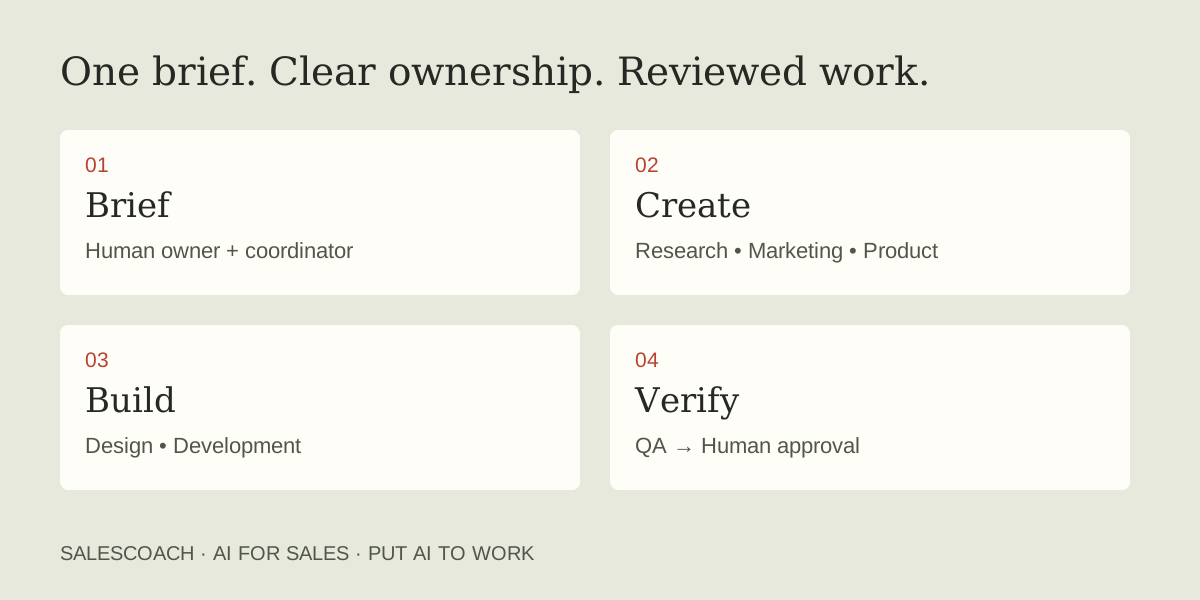
A useful team has a shared brief, named owners, a place to save the work, and a reviewer. Marketing, product, design, and development agents can help carry a buyer insight into a tested experience.

A human owner briefs a coordinator. Research, marketing, product, design, and development roles produce evidence and deliverables. QA checks the work before human approval.Build your team playbook →

Put the lessons into practice.

A few useful answers.

Where should a beginner start?

Start with the first AI sales workflow lesson. Use an anonymized example, a clear output format, and a source check. Then try discovery preparation and follow-up before automating a larger process.

Can AI replace customer interviews or relationships?

AI can organize evidence and help you rehearse. Simulated personas are not proof of customer demand. Real buyers must validate the problem, commitments, and experience.

Can these lessons send messages or update my CRM?

No. This training hub provides lessons and prompts. Using a connected assistant is a separate workflow that requires the appropriate permissions and your review.

What are AEO and GEO?

AEO means answer engine optimization; GEO means generative engine optimization. Both describe efforts to make useful information discoverable in AI answers. Google’s guidance emphasizes foundational SEO for its AI features. No approach guarantees citations or leads.

Do I need every tool listed?

No. Start with a tool you already have and a specific task. Add a design, video, CRM, or automation tool only when its contribution is clear and measurable.

Sources and further reading